Showing posts with label pda. Show all posts

Wednesday, August 8, 2012

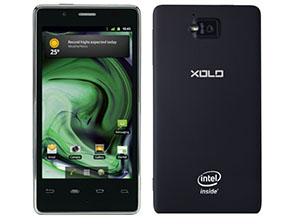
Lava XOLO X900 review


The first Intel smartphone is here. After years of work, California based Intel announced the first smartphones with its own Atom chips at the Mobile World Congress earlier this year. Not able to secure the support of popular smartphone manufacturers like HTC and Samsung, company went ahead with Chinese tech giant Lenovo and relatively unknown Indian manufacturer Lava to launch the initial smartphones.
The name Lava doesn't inspire much confidence in Indian consumers. While the company launched its first smartphone in India last year, it hasn't been able to generate much buzz. Intel needed hardware partners, and Lava needed a product that would help shed its image of a feature-phone manufactuer. In many ways, XOLO is a partnership of convience for both sides..
X900 is technically the first Intel powered smartphone to ship worldwide; it is based on Intel's Medfield reference design and has been priced at Rs. 21,999. In this review, we will be find out if the first Intel smartphone is capable making a place for Intel in the smartphone chip market.

Hardware
We have seen quite a few beautiful devices in the last few weeks. Coming from Sony's Xperia S, Lava XOLO X900 is a tad less aesthetically pleasing but that shouldn't be taken as a negative for the smartphone.
For a device that mirrors the reference design, XOLO X900 looks polished and feels nice in hand. The overall design isn't revolutionary but it is some fine work and consumers won't be disappointed.
lava-xolo-2.jpg
Featuring a rectangular shape, XOLO X900 reminds of iPhone 4/4S , it is similar in looks with the chrome ring, button placement and even the micro-SIM card slot, which isn't really bad.
The front of the X900 houses a 4.03-inch display with 1024x600p resolution, along with capacitive Android buttons, 1.3MP front camera, earpiece, MIC and a bunch of sensors. The micro-SIM card slot is present on the right side with two-stage dedicated camera button, volume rocker and speaker.
The matching second speaker for stereo sound is present on the left with HDMI-out port. The company hasn't clubbed any HDMI cable in the box, which would certainly have been a nice addition.
Bottom is pretty much clean apart from the Micro-USB cum charging port, while top includes power button and the 3.5mm headphone jack. On the rubberised back, consumers will find the 8MP camera, LED Flash, regulatory symbols, Intel and XOLO branding.
It might not be the thinnest or lightest phone around, but when it comes with real life usage, XOLO X900 works out pretty well.

Display
In the world of HTC One X and Apple iPhone 4S, manufacturers truly need some great work to compete with some really awesome display panels. WVGA no longer cuts and HD is the standard - anything less is simply a dissapointment for a top of the line smartpone.
Intel and Lava have opted something that falls in the middle - 1024x600p resolution; it is not very common for smartphones, but we have seen it in quite a few tablets including Kindle Fire and Samsung Galaxy Tab 620. It might not be 720p HD, but it is not a disappointment either. At its price, X900 will be competing with Motorola Atrix 2, Samsung Galaxy S Plus, which come with qHD and WVGA resolutions - thus X900 surely wins that race.
XOLO X900 features a 4.03-inch display, which is pretty decent and offers nice colour output and viewing angles. Although in comparison with the recent smartphones like HTC One X and Galaxy Nexus, we found it a tad underwhelming. But then that's a battle no one was expecting the X900 to win.
As the display has 295 pixels-per-inch, consumers would hardly notice any individual pixels on the device. Even the touch experience is great and we never had any problems with touch accuracy.
XOLO X900's display is also sufficiently bright and consumers will not have issues while operating the phone directly under the sun.

Camera
Cameras have become an integral part of smartphone experience these days, manufacturers are spending considerable amount of time and effort in bringing something unique and useful to the table. - The ImageSense enhancements in HTC One series of smartphones or Pureview technology in Nokia 808 are testament to the fact.
Intel and Lava have also tried to include their own set of improvements to the camera in X900 - let's see how they worked out.
lava-xolo-1.jpg
X900 houses an 8-megapixel camera sensor in the smartphone, which has been clubbed with one of the most comprehensive camera apps we have seen in recent times. It also comes with something called Burst Shot, last seen in HTC One X, that allows consumers to click upto ten pictures in less than a second.
Lava and Intel even had a dancer at the X900 launch to clearly show how effective burst shots can be while taking shots of something that is in motion. It was the first feature that we tried on X900 and it work flawlessly. Overall, even in non-burst mode, the quality of still captures was a tad disappointing. We found it sub-par and looking at the cameras in other modern smartphones, it certainly lacked a bit.
Shots taken from the 5MP camera of Galaxy Nexus were better in colour output, vibrancy and details than shots the 8MP camera of XOLO X900.
The camera app on the smartphone also offers various colour filters like Sepia, BW, Negative, which can be applied directly in the app itself.
The video recording interface on the phone is similar to the still imaging UI and it allows you to shoot up to 1080p video, which is pretty much a standard in high-end smartphones. You can even apply the colour effects while recording a video or set white balance or zoom. The recording output is decent and looks good. Camera maintains auto-focus continuously, which helps in capturing long videos with a lot of movement.
The 1.3MP front camera is decent and you can even record 720p videos with it.

Software/ Interface
Give us some Ice Cream Sandwich - consumers with old Android phones have been shouting the same since November 2011, when ICS source code was publically released. Even if we forgive manufacturers for being super-late in providing updates for old smartphones, how can they launch a new smartphone with old operating system version on-board?
Intel and Lava have done the same with XOLO X900. When manufacturers like HTC could launch their One series of devices with ICS and a comprehensive UI on-board, there is no excuse for Intel or Lava to release X900 with Gingerbread.
Having said that, as a Gingerbread smartphone, XOLO X900 is quite decent as company has kept the interface as well the whole Android experience pretty much stock. There are no extra applications loaded on the smartphone apart from the XOLO Care app and the inclusion of Swype.
Talking about the app compatibility, being the new architecture for Android, there is a lot of confusion on which apps will be compatible with the phone's Intel x86 platforms. While apps like Facebook, Twitter, Barcode Scanner, Astro, Dropbox, and Instagram work flawlessly, several games ,Shadowgun, Deer Hunter, Backstab, Temple Run, and Asphalt 6 amongst them, aren't supported as of date.
We hope Intel is working proactively with developers to get such apps ready for the platform.
lava-xolo-3.jpg
Performance /Battery Life
XOLO X900 recently became the first smartphone worldwide to ship with Intel's Atom Z2460 32nm SoC with processor clocked at up to 1.6 GHz. It also comes with a PowerVR SGX 540 GPU at 400 MHz, and a dual channel LPDDR2 memory.
Despite being powered a single-core processor, XOLO X900 performs at par with other smartphones in the same price-bracket, which are powered by dual-core processors. There is no-sluggishness or lag while going through menus or working with the applications.
Even before Intel entered the smartphone arena, a lot of questions were raised around the battery life of any future phones based on Intel processors. x86 has traditionally been seen as a power hungry platform, not suitable for use in smartphones and other devices where battery juice is at a premium.
The x86 power myth also seems busted as X900's battery backup is inline with any other competing high-end Android smartphone. Medium to heavy users will be able to pass the day with the smartphone's 1460 mAh battery.
The gaming performance in pretty good and most casual games worked flawlessly; although, we did miss many popular gaming titles because of incompatibility with the architecture.
Intel has clearly taken a big step with the first smartphone and it is certainly a worthy competitor, but there are few things that it needs work on - like app compatibility.

Verdict
While the Lava XOLO X900 performs pretty well for its price, the positioning as well as the branding might well end up hurting the phone. Although Lava has pitched it under the name XOLO, Indian consumers are very brand conscious and a 'Lava-made Rs. 22,000 phone' factor will surely play a lot of role in their buying decision. But, if you can look beyond the brand, XOLO X900 is worthy of consideration.

Ratings
Design: 3
Display: 3.5
Camera: 3
Performance: 3.5
Software: 3
Battery Life: 3.5
Value for Money: 3
Ecosystem: 3
Overall: 3.5

Wednesday, August 1, 2012

HTC One S Review


T-Mobile has had it tough over the last couple of years, culminating into a failed takeover bid by mobile networking giant AT&T.
The No. 4 network carrier in the US has since jumped on the LTE bandwagon, while also attempting an image re-branding and focusing on its fast 42MBps HSPA+ network, until the LTE network is ready to roll out in 2013. Strategic marketing aside, the best way to get back into the consumers’ good graces is to provide devices and plans that users actually want.
With this in mind, T-Mobile has added and will continue to add some hugely popular Android devices to its line up, such as the HTC One S, the Samsung Galaxy Note, and now the Samsung Galaxy S3. Today we take a look at one of T-Mobile’s flagship Android devices, the HTC One S.

Form Factor

Whatever complaints users may have about HTC’s One series lineup (no microSD, non-removable battery), the Taiwan-based manufacturer has gone all out in creating elegant and beautifully designed devices. While most manufacturers are leaning towards cheap, glossy plastics for their device bodies, the HTC One S features an unique aluminium unibody design, which was created by the much-talked about “micro-arc oxidization treatment.”
A glossy blue ring surrounds the camera lens at the back of the One S. On removing the SIM card panel, you can see that the blue color extends into the “internals” of the phone as well. There’s only a small cover that is removable at the top of the device for the SIM card. Granted, this means that the battery is non-removable, but it does add a touch of elegance to the design. The AMOLED display protected by a curved Corning Gorilla glass sheet extends into the body and gives a feel of  ”all screen.”
The One S is HTC’s thinnest device, at only 7.8mm thickness and is very light, weighing only 119.5g. While we’re seeing a shift to radically larger screen sizes, the 4.3″ display of the One S is optimal in my opinion. This makes one-handed use of the device very easy, and is a huge plus point for the device. The design is minimalist, with only the camera lens grabbing any attention. For me, simple and elegant has always been the key, and HTC has certainly stepped up with the design of the One S.

Specifications

Although the middle brother of the One series, the specifications of the One S is nothing to scoff at. Specs include:
  • 4.3″ qHD super AMOLED display
  • 960×540 resolution
  • 1.5 Ghz dual-core Qualcomm Snapdragon S4 processor

  • 1GB RAM
  • 16 GB internal storage, no microSD expansion
  • Android 4.0 with HTC Sense 4.0
  • 1,650 mAH battery
  • Beats Audio

Display

The HTC One S features a qHD Super AMOLED display, with a resolution of 960×540, which is a notch lower than big brother One X, which features a super LCD 2 display, with a 1280×720 resolution. The debate of AMOLED vs LCD will rage on, but in the case of the One S, the display is bright with (mostly) sharp colors that really pop. Overall, it’s a pleasure to gawk at.

Software

The HTC One S, like all of HTC’s recent devices, features Android 4.0 with HTC Sense 4.0. Let’s take a look at some of the software highlights:
  • Not many people prefer manufacturer UI overlays, but if I had to choose one, it would be the HTC Sense 4.0. The latest iteration of Sense allows for a lot of customization, with multiple options for skins and scenes. HTC has also tweaked a lot of stock ICS features, such as the method for closing recent apps, to give a more consistent feel. Also featured is a new lock screen that allows you to directly open up to 4 apps, as well as folders, directly from the lock screen. Beautiful animations and a much faster and lighter feel make Sense 4.o one of the better UI overlays available.
  • You know there is a lot of bloatware when you have 4 pages of apps in the app drawer, and only 3 have been downloaded from the Play Store (see video). Apart from the HTC and Android pre-loaded apps, the T-Mobile device includes a lot of additional apps from the carrier, such as 411 & More, Game Base, Lookout Security, T-Mobile Hotspot, My T-Mobile, More for Me, T-Mobile Name ID, Polaris Office, and Where’s My Water. As usual, most of these pre-loaded apps cannot be uninstalled.
  • Tapping the Home capacitive button or using a pinch gesture opens up a “top view” of all panels. From there, you can set which panel will be your homescreen and also add panels, if required.
  • The Task Manager features RAM management and allows you to end all tasks at once. Settings include Automatic Startup and Memory Use notifications.
  • Browser features include “View desktop site” mode, enable/disable flash player, HTML 5 support, and a convenient tab management system.

  • Beats Audio integration across the board, for all audio and video needs. Unfortunately, can be used only with headphones.
  • Multiple add-on widgets, elegant scrolling and other animations, task management options, easy folder creation, user customizations and tweak options, and fast performance combine to create an amazing user experience.

Performance

The dual-core Snapdragon S4 processor by Qualcomm is the SoC featured in a lot of top devices these days, and in every LTE-capable smartphone released in the US. Although, this is primarily because of the incompatibility issues with LTE radios, the dual-core S4 performs really well in in benchmark tests. The HTC One S features 1GB of RAM, which already seems dated with 2GB RAM becoming the new “minimum” requirement, but does not take away from performance in any way.
As you can see from the Quadrant benchmark, which is a CPU, I/O, and 3D graphics benchmark test, the HTC One S scored a 5073. This is a fairly high score, and in-fact, by a small margin, beat the score of the quad-core Nvidia Tegra 3 powered international version of the HTC One X.

Camera

One of the best of the HTC One S features is its amazing camera technology. The One S features an 8MP BSI (back side illuminated) sensor, with a dedicated HTC ImageChip and HTC ImageSense technology. LED flash also allows for enhanced low-light performance. The One S also has a front-facing VGA camera with 720p HD video recording capability.
HTC has completely revamped the camera app, making it very easy and convenient to capture quick, high-quality images. Pressing and holding the camera button enables the burst shot mode, allowing you to capture up to 99 images per minute, with a further option to select a “Best Shot” or have the app select one for you.

Sample Image (Source: HTC)
The camera shutter button and video capture button are available at the same time, which is a time-saver and removes the need for toggling between modes. Even better is the ability to capture images while shooting video, which can also be done after a video shoot is completed.
There are numerous settings, video options, image options, and filters, that provides an amazing camera experience. Truly, with the advances in smartphone camera technology, the need for a point-and-shoot camera is slowly becoming a memory.

Video


Conclusion

HTC has done a lot of things right with the ultra-thin and lightweight HTC One S, with its optimal screen size, elegant design, amazing display, great camera, and software enhancements to complement the powerful hardware. The One S is available exclusively from T-Mobile, but I’m surprised that other network carriers haven’t picked this device up as a mid-range alternative to the HTC One X and its variations. This means that if the HTC One S is the device for you, you will have to switch to T-Mobile’s network. But if you’re an existing customer, you should definitely check out this amazing device.
What are your thoughts? Will you buying the HTC One S? Let us know in the comments section below.


Wednesday, July 11, 2012

Samsung Galaxy S III : Review

Samsung's rise in the mobile phone arena in the last few years has been phenomenal. The company has truly come a long way and the success of its last two flagship smartphones played a huge role. It is in this backdrop that Samsung's latest flagship phone becomes so important to the company.
When JK Shin, President and Head of IT & Mobile Communications Division at Samsung, was standing on the podium on May 3, 2012, stakes were high and everyone was anticipating a smartphone that would leave the competition behind. It was going to be the third iteration of company's much successful Galaxy S smartphone. He did unveil something that was extraordinary and full of exciting features and industry leading specifications, but will this new smartphone be able to leave the competition behind and prove powerful enough to take on Apple's upcoming iPhone and HTC's flagship One X? We will find out in this review.

Hardware
Smartphone after smartphone, Samsung has showcased that it continues to put more emphasis on the display of the smartphone and same is visible in S III. The 4.8-inch display on the phone is the single main highlight of the phone. It almost takes the whole of the front, leaving little space for the buttons, front camera and sensors. We don't mind that because by limiting the bezel and removing any unwanted space, Samsung has been able to fit the huge display in much smaller device, which is easier to hold and operate. But, you still have to adjust your grip at times and use both hands while operating the phone at many occasions.
There is nothing extraordinary about Galaxy S III design apart from the fact that it houses so much in such a thin body. Company has played safe and conservative, while the direct competitor to the phone One X is a result of HTC's attempt to do something different, which actually works quite well.
sgs3-sides.jpg
We are not saying that the Galaxy S III design is bad but it is definitely uninspired. However, it is quite functional and well-built. The no frills design borrows quite a few elements from company's last two Galaxy S models. The home button makes an appearance once again, coupled with same Android button arrangements, and familiar speaker/ ear-piece grill.
Similar to other flagships, a single sheet of glass carefully covers the front; the only bumps are home button and ear-piece grill on the top. As we are on the topic of the home button, it is important to point out that home button was actually a little disappointment for us. In the attempt to fit everything in smaller case, Samsung has reduced the size of home button considerably. We would've preferred a capacitive touch button instead of this small physical home button.
Back to the build of the smartphone, thanks to the plastic body and the usual paper thin battery cover, company has been able to keep the smartphone weight to just 133 grams, which is just 3 grams more than HTC One X.
It is interesting to note here is that Samsung has been able to pack a 2100 mAh user- removable battery in just 8.6mm thick body along with microSD card slot. So, rather than paying more for a bigger internal memory version of the phone, you can actually just pop in a card when required.
It also packs a Micro-USB port at the bottom, which is also used for charging, data transfer via PC and to connect to HDMI devices.
Overall, with all the glossy finish and rounded corners, the build quality is quite decent. Despite being plastic, the smartphone feels nice in hand and is very well put together.

Display
The huge 4.8-inch display on Galaxy S III is obviously the first feature that you will notice on the smartphone and it won't let you down. S III comes with a Super AMOLED HD display, which has the same underlying technology as Galaxy Nexus but has been improved a lot during the time period between both the launches. However, HTC's One X is still able to score over Galaxy S III in the display category; the LCD on One X has great viewing angles, best in the class clarity and colour balance. On the other hand, the bluish tinge is present on Galaxy S III display and the automatic brightness doesn't work as expected.
sgs3_with_others.jpg
We won't go in Pentile vs non-Pentile debate here, as that doesn't really matter in the real-life usage of the smartphone. Overall, the colours are vivid, text is clean, readable and viewing angles are great.

Camera
HTC has set a high bar for smartphone cameras with its One X but Samsung has been able to best it with Galaxy S III. The image quality of the smartphone is simply outstanding. The images are sharp and clear, and even the full resolution images are pretty neat.
The 8MP camera on-board provides a holistic imaging experience and removes any need to carry multiple devices for basic photo needs.
Company has also included burst mode in smartphone camera, which allows consumers to capture 20 shots in one go with around 6 shots per second.
The camera software is pretty similar to what you might have seen on Galaxy S II; it is simple and easy to use. Most of the settings and controls are present on the left and the video/photo mode toggle along with capture button is on the right. It might not be as intuitive as One X's camera app, but the quality of images taken from camera fills up that gap.
Samsung has added HDR mode to Galaxy S III, which takes multi shots at various exposure values and combines them to create a single image. HDR helps you in situations where two parts of your photo frame have very different lighting condition.
sgs3_camera.jpg
The 1.9MP front camera on the smartphone is pretty neat and gives decent output. As the smartphone comes with built in video call support over telecom network, you will find using it quite often.
Moving on to the video recording, thanks to the ultra-fast processor inside the device, recording video worked as expected, auto-focus is slightly spotty but rest works fine. Galaxy S III also allows tap-to-focus in video recording, thus helping you in capturing even better videos.
The only missing part is on the optical side, Galaxy S III only supports a maximum aperture of f/2.6, which is well behind than f/2.0 on HTC One X. It means, Galaxy S III will be slightly worse in low-lighting conditions.

Software/ Interface
sgs3-software_home.jpg
Samsung Galaxy S III runs on Android 4.0.4, but if you remember Ice Cream Sandwich from its stock looks, then you won't be able to recognise it on the smartphone. Samsung has gone all out to skin the hell out of ICS on S III.
There is hardly any part of the smartphone that looks like ICS on Galaxy Nexus. But, then it is expected from the Korean manufacturer to help it differentiate the device in such a competitive market.
Do these customisation work or are they just adding bloat to refreshing Ice Cream Sandwich? Well, up to a large extent, they do work.
One of major part of Samsung's Galaxy S III announcement was dedicated to the several software customisations that company has made in this smartphone. Several new features that have been added to it are not present in any other Android smartphone even from Samsung.
Samsung has not only added these features but has also decided to stay away from Android buttons introduced in ICS ( Home, Back and Multitasking) and has chosen to use good old Gingerbread style buttons - Home, Back and Menu (no multitasking button here and it can be managed by long pressing the home button).
sgs3-software_toggle.jpg
Apart from home screen, the first customisation to be noticed on Galaxy S III is the set of quick toggles present in notification bar. Other such improvements include trash icon shortcut in Gallery app, and quick access of detailed volume control.
sgs3-software_s-beam.jpg
Many of the old Touchwiz features are still present in S III, like swiping the contact name left or right to message or call. Lock screen has been customised as well to include app shortcuts, which can further be altered as per your preferences.
The additions are not just limited to these little tweaks; company has made some big feature additions as well. One of our favourites from these features is "Pop up Play," the ability to play video anywhere on your screen simultaneously while doing other tasks. S-Beam is another enhancement from the company that has been made over Android beam, which is present by default in ICS. Samsung has actually combined the functionalities of NFC and Wi-Fi Direct in S-Beam, thus allowing you to transfer not only small packets of information but also big amount of data. S-Beam currently works with Galaxy S III only, so the functionality is limited right now.
Coming to the Samsung's answer to Apple's voice assistant Siri, S-Voice, we must say that it is just a big gimmick and adds no value whatsoever. Even in terms of gimmick quotient, the functionality of S-Voice is very limited when compared to Siri. S-Voice only responds to typical command, there is no personality to it at all, so if you were planning to ask some random question, stop right there, it won't answer.
sgs3-software_s-voice.jpg
It works well with commands and we are not sure how much of use would that be to you. After looking at the next version of Siri at WWDC, S-Voice is now looking even more inferior. One positive with S-Voice over Siri is that the former understands the Indian accent better.
Other such features include Smart Stay, Direct Call, Social Tag, Buddy Photo Share, and All Share Play/Cast. During our time with Galaxy S III, the Direct Call functionality that allows you to directly call a person whom you are sending a text by simply picking up the phone and putting it next to your ear, worked perfectly. However, we are disappointed by Smart Stay; it did not work as advertised by the company. The results were irregular, only working sometimes.

If you are wondering about the stock ICS features, under the Samsung's nature inspired UI, all of the additions that were made by Google in ICS are also present on the phone including Face Lock, detailed data info, and battery usage charts.
Well, not everything is hunky-dory here. Some of the Samsung's tweaks to Android 4.0 actually fall flat and the method of creating folders is one of them. The dragging and dropping an app on another to create folder doesn't actually work in Galaxy S III. To make a folder, you will have to open app drawer select one app and then drag that to create folder icon, which will then be placed on the home-screen. Another such fail is the removal to Play Store shortcut from top right corner of app drawer screen; Samsung has replaced that with a link to downloaded apps.

Performance/ Battery Life
No surprises here. The 1.4GHz Exynos Quad powered Galaxy S III is really a powerhouse and it is clearly visible in every single action on the smartphone. If you liked using Tegra 3 powered tablet or even One X, you will like the S III even more.
We won't go into any technical jargon or benchmarks here, although they agree, but in real-world usage, the  Galaxy S III performs brilliantly and does everything that you throw at it without showing any strain.
Whether you are working on image heavy documents, opening huge webpages or watching 1080p clips, there is no lag at all. The performance is simple unsurpassed. We can't wait for the apps that fully exploit the S III's power.
sgs3_homebutton.jpg
Call quality and network reception are both superior and you will not face any issues.
Performance review cannot be completed without actually talking about the battery life of the smartphone and the Galaxy S III packs in a big 2100 mAh battery, which is also user-replaceable (do need to keep in mind that stock battery also houses NFC chip).
Despite the big HD display and quad-core processor on board, Samsung Galaxy S III will not give you a  battery low warning in a day's judicious use, but heavy users might not be so lucky. Because of the presence of a big battery, Galaxy S III also takes around three hours to get fully charged.

Verdict
Consumer expectations were very high after Galaxy S II and Galaxy Nexus, and Samsung has been able to beat them by presenting a technological marvel in the form Galaxy S III. The camera, processor, and the software customisations, all are best in the class right now. It might not have the looks of One X, but it scores in almost everything else.
In the end, it all comes down to one thing - the pricing is, somewhat surprisingly, on the upside. Priced at Rs. 43,180, it is way more than HTC One X's Rs. 37,899 maximum retail price. Street price might be a little lower, but looking at the current pricing, HTC One X is the better deal however Galaxy S III is a better phone. So, if price is no barrier to you, go for it.

Sunday, March 25, 2012

The Top 30 Android Apps And Games Of 2011

.
Unlike iOS applications, which are basically created for two form factors, Android apps need to be developed with dozens (if not hundreds) of device-types in mind. This is on top of the inconsistent operating system releases still mucking things up. While all of this fragmentation is a headache for developers, ignoring a platform with 50 percent market share would ultimately lead to their peril.
The best Android apps are thus the ones that can both push the technological envelope while also remaining accessible to the vast majority of users. This is no easy feat.
We divided our list of the best 30 Android apps into four distinct categories. The top ten apps come from third-party developers, and, if not exclusive to Android, were created primarily for the platform. Additional sections include the best new or significantly updated apps from Google, as well as the best apps and games that appeared first on iOS but later arrived to Android in 2011.
Funded by Google Executive Chairman Eric Schmidt, Any.DO is the best productivity and to-do application tailored specifically for Android devices. The app’s elegant interface is optimized to limit actual typing through voice-driven commands. Users can swipe each task when complete, and shake their phones to clear them from the screen. The app also offers (mostly) seamless integration with Google accounts.
More than just an Instagram for Android, Lightbox offers features like photo journals and the ability to arrange pictures by personal timelines that make it unique and, to some, indispensable. The app’s stunning visual display and compatibility on multiple Android devices set the standard moving forward for photo-sharing apps on the platform.
Along with Google Music (see below), Amazon MP3 is the best way for an Android smartphone and tablet owner to kick an iTunes habit. The app provides access to a library of nearly 20 million songs, 5GB of free storage, and reliable offline listening. Subscriptions to Amazon’s Cloud Drive service start at a reasonable $20/year for 20GB of storage, but you can store as much of your own music as you like with that subscription.
Android devices offer so many customization features that sometimes using a larger screen, mouse and full-sized keyboard will help you get the most out of your smartphone or tablet device. This free app lets users operate their smartphones from a PC with a Wi-Fi connection. Additionally, AirDroid emphasizes privacy protection with password changes for each use.
After launching a beta app last year, SwiftKey X arrived on Android smartphones and tablets in 2011. The app has larger keys as well as superior word and sentence prediction algorithms than what is typically found on Androids. SwiftKey also learns from previously typed emails and messages, and offers three color schemes to simplify the process and brighten things up.
Acquired by Evernote, Skitch lets users annotate photos with sketches, images and words. The app has dead simple editing tools and the ability for users to draw with multi-colored crayons. Skitch is a great app for kids in addition to serving as a functional and unique photo-sharing service.
While still in Alpha, BlueStacks is demonstrating how Android applications can run on Windows-based PCs. The Android app works in concert with the Windows-based BlueStacks App Player to run mobile applications on PCs. The venture-backed company and application, which has attracted more than 500,000 early adopters since launch, expects to debut a Mac OS version in 2012.
8. Qello
Available as separate applications for Android smartphones and tablets, Qello offers a great catalog of high definition concerts (mostly rock, but with other genres sprinkled in). Users can sample the 500+ titles for free, or lease any of them on a weekly ($1.99) or monthly basis ($4.99).
Developed specifically for Honeycomb-based tablet devices, this all-inclusive weather application showcases the beauty and utility of Android on larger form factors. The Lifestyle section, which informs users on things like whether it is a good day for biking or bad day for allergies, is a nice humanized touch.
Android is all about customization, and there is no better and more comprehensive widget app available than this one. Optimized for Android tablets and smartphones, HD Widgets is great for Android experts and first-timers alike. Users will also appreciate the “fanatical” customer service of the developers.
Here are the five best Android apps developed by Google that were released or received significant updates in 2011.
As long as Flipboard remains exclusive to iOS devices, this new release from Google serves as the premier news reader on Android smartphones and tablets. More of a fast and elegant aggregator than social magazine, Google Currents benefits from an organized layout and dead simple third-party publisher platform. There is also — shockingly — nice integration with Google+, including curated content from the likes of Robert Scoble and Guy Kawasaki.
12. Google+
Google became a relevant player in social networking this year with the successful launch of Google+. While the service is also available as an iPhone app as well as a web app through BlackBerry, Windows and Symbian platforms, Google understandably treats its own platform as first among equals. Check-ins for business, for instance, rolled out first on the Android app.
A November update to this trailblazing application introduced indoor mapping functionality to mobile devices. Google Maps 6.0 helps users more easily navigate within airports, shopping malls and other locations where GPS technology is spotty.
While no mobile application matches the utility of Google Docs on a desktop or laptop, this official version for Android is pretty close. If you’re a hardcore Google Docs user, this app will help you break free from your desk and still read and edit docs and spreadsheets on the fly.
Like Amazon MP3 cited above, Google Music is a way for Android users to comfortably cut the cord (or cloud) on iTunes (at least on their mobile devices). The app lets users store up to 20,000 songs for free in the cloud, with a portion available for offline access.
These next 10 apps were initially released for iOS devices. They are included here for their utility, entertainment value and impact on the Android ecosystem.
When Amazon unveiled this price-comparison app to Android devices just before Black Friday, the company’s retail Death Star became fully operational. Sure, Price Check was available to iPhone owners a year earlier, and there are similar apps across all major mobile platforms. But having an Android app gives Amazon critical mass in this category, and allows the company to (again) upend physical retail as we know it. This includes offering discounts to consumers on their phones during the point of comparison.
17. Netflix
There were a lot of things that Netflix did horribly wrong in 2011. Releasing a killer Android app for smartphones and tablet devices was not one of them. As Android tablets become ready for prime time and more plausibly compete against the iPad, entertainment apps like Netflix will flourish.
The most innovative music detection and discovery app of the year finally arrived to Android in December. SoundTracking not only identifies a song a user is listening to, but shares it with Facebook, Twitter and foursquare friends and followers. The advantage of the Android app, relative to the iOS version which launched earlier this year, is that users with Spotify and Rdio can listen to entire tracks (as opposed to 30-second snippets from iTunes).
Hipmunk differentiates from the run-of-the-mill flight search applications by predicting how painful your traveling might be. The app’s “Agony Index” takes into account factors beyond price including flight duration, Wi-Fi access and other variables. Once users choose the least painful flight, the app accommodates direct booking and provides access to third-party services.
This app translates nutritional information found on food packaging into plain English, and offers a letter grade as to how healthy or harmful an item can be. The app offers comprehensive coverage of both mainstream brands and niche delicacies via the scanning of barcodes. Best of all? The app suggests healthier, similar alternatives to the worst offenders.
Reading classic comics within this app works on virtually any size Android screen — which is no easy feat. Marvel Comics also offers panel-by-panel viewing that features beautiful art and more legible word balloons. While most titles require a subscription, there are an ample amount of classic comics available for free.
For digitally promiscuous users who store and share files on multiple devices and operating systems powered by Android, iOS and Windows, Syncplicity is a useful way to manage libraries found within all of them. Unlike many cloud-based alternatives, Syncplicity uses encryption to secure files.
23. Starbucks
After launching initially on iOS and BlackBerry smartphones, the official Starbucks app finally arrived on Android earlier this year. Better late than never. The app lets users manage their Starbucks Cards and purchase coffee and the like at nearly 7,000 U.S. locations.
24. LinkedIn
After what seemed like an eternity in beta, LinkedIn finally launched an Android app ready for prime time in the spring. While not perfect, the LinkedIn app is a much better alternative than the company’s more limited mobile site. Finally, this indispensable professional networking service found a full-time gig on Android.
25. Path
A significant December update to this social blogging app on Android and iOS devices served as an early holiday present to its passionate and vocal adherents. Beyond sharing photos, users can now tell the world about what music they are listening to and other activities they are doing. The app’s new design and “Automatic” feature, which recognizes when users deviate from routine schedules, also separate Path from the pack.
And finally, we present the five best games to arrive to Android devices in 2011. Notably, they all first appeared on the iPhone, iPad and iPod Touch.
While not a household name like Angry Birds, Cut the Rope is among the most addictive and popular mobile games of all time. The graphics and music are superb, and Cut the Rope is optimized and plays very well on larger Android tablet devices. This is another multi-platform grand slam for (Angry Birds) publisher Chillingo.
One of the most original and well-crafted physics-based puzzle games around finally made its way to Android devices in late November. Originally an indie hit on PCs, World of Goo is a construction game in which users must connect goo balls together to build structures so that other goo balls can get to the end of each stage. The abstract art and imagery alone make it worth the five bucks to download.
A clever and addictive puzzle game by Disney, Where’s My Water? combines whimsical design with killer gameplay. Players are tasked with keeping a sewer-dwelling alligator named Swampy clean and pristine while guiding him through urban terrain. Easier said than done, particularly with Swampy’s alligator buddies standing in the way.
This classic title from PopCap, which was acquired by Electronic Arts in July, first came to Android earlier this year via the Amazon App Store. It was sold exclusively on Amazon until early December. Fans of the cartoony tower defense game will enjoy tapping into Plants vs. Zombies on Android devices.
The best racing game available for Android devices, Asphalt 6: Adrenaline HD combines plenty of cars and game modes — including a psychedelic “Adrenaline” boost — with superlative visuals and gameplay. This one deserves the checkered flag.