Showing posts with label mobile. Show all posts

Wednesday, August 8, 2012

Lava XOLO X900 review


The first Intel smartphone is here. After years of work, California based Intel announced the first smartphones with its own Atom chips at the Mobile World Congress earlier this year. Not able to secure the support of popular smartphone manufacturers like HTC and Samsung, company went ahead with Chinese tech giant Lenovo and relatively unknown Indian manufacturer Lava to launch the initial smartphones.
The name Lava doesn't inspire much confidence in Indian consumers. While the company launched its first smartphone in India last year, it hasn't been able to generate much buzz. Intel needed hardware partners, and Lava needed a product that would help shed its image of a feature-phone manufactuer. In many ways, XOLO is a partnership of convience for both sides..
X900 is technically the first Intel powered smartphone to ship worldwide; it is based on Intel's Medfield reference design and has been priced at Rs. 21,999. In this review, we will be find out if the first Intel smartphone is capable making a place for Intel in the smartphone chip market.

Hardware
We have seen quite a few beautiful devices in the last few weeks. Coming from Sony's Xperia S, Lava XOLO X900 is a tad less aesthetically pleasing but that shouldn't be taken as a negative for the smartphone.
For a device that mirrors the reference design, XOLO X900 looks polished and feels nice in hand. The overall design isn't revolutionary but it is some fine work and consumers won't be disappointed.
lava-xolo-2.jpg
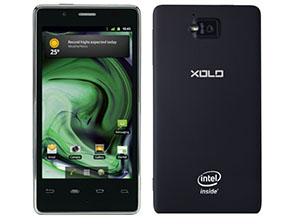
Featuring a rectangular shape, XOLO X900 reminds of iPhone 4/4S , it is similar in looks with the chrome ring, button placement and even the micro-SIM card slot, which isn't really bad.
The front of the X900 houses a 4.03-inch display with 1024x600p resolution, along with capacitive Android buttons, 1.3MP front camera, earpiece, MIC and a bunch of sensors. The micro-SIM card slot is present on the right side with two-stage dedicated camera button, volume rocker and speaker.
The matching second speaker for stereo sound is present on the left with HDMI-out port. The company hasn't clubbed any HDMI cable in the box, which would certainly have been a nice addition.
Bottom is pretty much clean apart from the Micro-USB cum charging port, while top includes power button and the 3.5mm headphone jack. On the rubberised back, consumers will find the 8MP camera, LED Flash, regulatory symbols, Intel and XOLO branding.
It might not be the thinnest or lightest phone around, but when it comes with real life usage, XOLO X900 works out pretty well.

Display
In the world of HTC One X and Apple iPhone 4S, manufacturers truly need some great work to compete with some really awesome display panels. WVGA no longer cuts and HD is the standard - anything less is simply a dissapointment for a top of the line smartpone.
Intel and Lava have opted something that falls in the middle - 1024x600p resolution; it is not very common for smartphones, but we have seen it in quite a few tablets including Kindle Fire and Samsung Galaxy Tab 620. It might not be 720p HD, but it is not a disappointment either. At its price, X900 will be competing with Motorola Atrix 2, Samsung Galaxy S Plus, which come with qHD and WVGA resolutions - thus X900 surely wins that race.
XOLO X900 features a 4.03-inch display, which is pretty decent and offers nice colour output and viewing angles. Although in comparison with the recent smartphones like HTC One X and Galaxy Nexus, we found it a tad underwhelming. But then that's a battle no one was expecting the X900 to win.
As the display has 295 pixels-per-inch, consumers would hardly notice any individual pixels on the device. Even the touch experience is great and we never had any problems with touch accuracy.
XOLO X900's display is also sufficiently bright and consumers will not have issues while operating the phone directly under the sun.

Camera
Cameras have become an integral part of smartphone experience these days, manufacturers are spending considerable amount of time and effort in bringing something unique and useful to the table. - The ImageSense enhancements in HTC One series of smartphones or Pureview technology in Nokia 808 are testament to the fact.
Intel and Lava have also tried to include their own set of improvements to the camera in X900 - let's see how they worked out.
lava-xolo-1.jpg
X900 houses an 8-megapixel camera sensor in the smartphone, which has been clubbed with one of the most comprehensive camera apps we have seen in recent times. It also comes with something called Burst Shot, last seen in HTC One X, that allows consumers to click upto ten pictures in less than a second.
Lava and Intel even had a dancer at the X900 launch to clearly show how effective burst shots can be while taking shots of something that is in motion. It was the first feature that we tried on X900 and it work flawlessly. Overall, even in non-burst mode, the quality of still captures was a tad disappointing. We found it sub-par and looking at the cameras in other modern smartphones, it certainly lacked a bit.
Shots taken from the 5MP camera of Galaxy Nexus were better in colour output, vibrancy and details than shots the 8MP camera of XOLO X900.
The camera app on the smartphone also offers various colour filters like Sepia, BW, Negative, which can be applied directly in the app itself.
The video recording interface on the phone is similar to the still imaging UI and it allows you to shoot up to 1080p video, which is pretty much a standard in high-end smartphones. You can even apply the colour effects while recording a video or set white balance or zoom. The recording output is decent and looks good. Camera maintains auto-focus continuously, which helps in capturing long videos with a lot of movement.
The 1.3MP front camera is decent and you can even record 720p videos with it.

Software/ Interface
Give us some Ice Cream Sandwich - consumers with old Android phones have been shouting the same since November 2011, when ICS source code was publically released. Even if we forgive manufacturers for being super-late in providing updates for old smartphones, how can they launch a new smartphone with old operating system version on-board?
Intel and Lava have done the same with XOLO X900. When manufacturers like HTC could launch their One series of devices with ICS and a comprehensive UI on-board, there is no excuse for Intel or Lava to release X900 with Gingerbread.
Having said that, as a Gingerbread smartphone, XOLO X900 is quite decent as company has kept the interface as well the whole Android experience pretty much stock. There are no extra applications loaded on the smartphone apart from the XOLO Care app and the inclusion of Swype.
Talking about the app compatibility, being the new architecture for Android, there is a lot of confusion on which apps will be compatible with the phone's Intel x86 platforms. While apps like Facebook, Twitter, Barcode Scanner, Astro, Dropbox, and Instagram work flawlessly, several games ,Shadowgun, Deer Hunter, Backstab, Temple Run, and Asphalt 6 amongst them, aren't supported as of date.
We hope Intel is working proactively with developers to get such apps ready for the platform.
lava-xolo-3.jpg
Performance /Battery Life
XOLO X900 recently became the first smartphone worldwide to ship with Intel's Atom Z2460 32nm SoC with processor clocked at up to 1.6 GHz. It also comes with a PowerVR SGX 540 GPU at 400 MHz, and a dual channel LPDDR2 memory.
Despite being powered a single-core processor, XOLO X900 performs at par with other smartphones in the same price-bracket, which are powered by dual-core processors. There is no-sluggishness or lag while going through menus or working with the applications.
Even before Intel entered the smartphone arena, a lot of questions were raised around the battery life of any future phones based on Intel processors. x86 has traditionally been seen as a power hungry platform, not suitable for use in smartphones and other devices where battery juice is at a premium.
The x86 power myth also seems busted as X900's battery backup is inline with any other competing high-end Android smartphone. Medium to heavy users will be able to pass the day with the smartphone's 1460 mAh battery.
The gaming performance in pretty good and most casual games worked flawlessly; although, we did miss many popular gaming titles because of incompatibility with the architecture.
Intel has clearly taken a big step with the first smartphone and it is certainly a worthy competitor, but there are few things that it needs work on - like app compatibility.

Verdict
While the Lava XOLO X900 performs pretty well for its price, the positioning as well as the branding might well end up hurting the phone. Although Lava has pitched it under the name XOLO, Indian consumers are very brand conscious and a 'Lava-made Rs. 22,000 phone' factor will surely play a lot of role in their buying decision. But, if you can look beyond the brand, XOLO X900 is worthy of consideration.

Ratings
Design: 3
Display: 3.5
Camera: 3
Performance: 3.5
Software: 3
Battery Life: 3.5
Value for Money: 3
Ecosystem: 3
Overall: 3.5

Wednesday, July 11, 2012

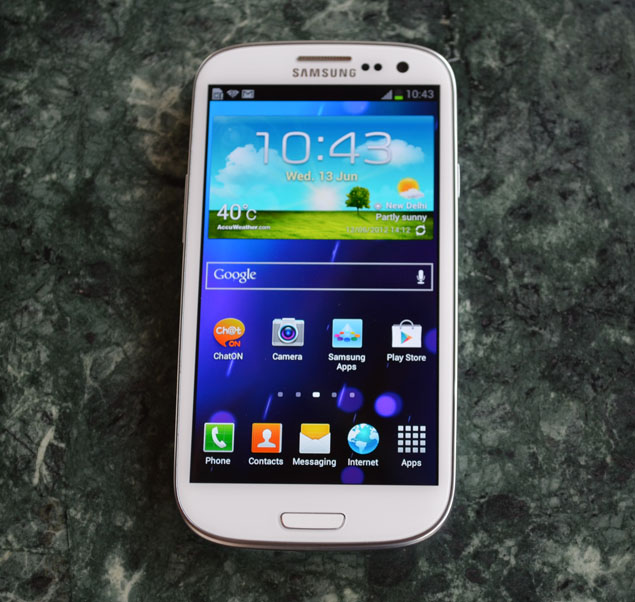
Samsung Galaxy S III : Review

Samsung's rise in the mobile phone arena in the last few years has been phenomenal. The company has truly come a long way and the success of its last two flagship smartphones played a huge role. It is in this backdrop that Samsung's latest flagship phone becomes so important to the company.
When JK Shin, President and Head of IT & Mobile Communications Division at Samsung, was standing on the podium on May 3, 2012, stakes were high and everyone was anticipating a smartphone that would leave the competition behind. It was going to be the third iteration of company's much successful Galaxy S smartphone. He did unveil something that was extraordinary and full of exciting features and industry leading specifications, but will this new smartphone be able to leave the competition behind and prove powerful enough to take on Apple's upcoming iPhone and HTC's flagship One X? We will find out in this review.

Hardware
Smartphone after smartphone, Samsung has showcased that it continues to put more emphasis on the display of the smartphone and same is visible in S III. The 4.8-inch display on the phone is the single main highlight of the phone. It almost takes the whole of the front, leaving little space for the buttons, front camera and sensors. We don't mind that because by limiting the bezel and removing any unwanted space, Samsung has been able to fit the huge display in much smaller device, which is easier to hold and operate. But, you still have to adjust your grip at times and use both hands while operating the phone at many occasions.
There is nothing extraordinary about Galaxy S III design apart from the fact that it houses so much in such a thin body. Company has played safe and conservative, while the direct competitor to the phone One X is a result of HTC's attempt to do something different, which actually works quite well.
sgs3-sides.jpg
We are not saying that the Galaxy S III design is bad but it is definitely uninspired. However, it is quite functional and well-built. The no frills design borrows quite a few elements from company's last two Galaxy S models. The home button makes an appearance once again, coupled with same Android button arrangements, and familiar speaker/ ear-piece grill.
Similar to other flagships, a single sheet of glass carefully covers the front; the only bumps are home button and ear-piece grill on the top. As we are on the topic of the home button, it is important to point out that home button was actually a little disappointment for us. In the attempt to fit everything in smaller case, Samsung has reduced the size of home button considerably. We would've preferred a capacitive touch button instead of this small physical home button.
Back to the build of the smartphone, thanks to the plastic body and the usual paper thin battery cover, company has been able to keep the smartphone weight to just 133 grams, which is just 3 grams more than HTC One X.
It is interesting to note here is that Samsung has been able to pack a 2100 mAh user- removable battery in just 8.6mm thick body along with microSD card slot. So, rather than paying more for a bigger internal memory version of the phone, you can actually just pop in a card when required.
It also packs a Micro-USB port at the bottom, which is also used for charging, data transfer via PC and to connect to HDMI devices.
Overall, with all the glossy finish and rounded corners, the build quality is quite decent. Despite being plastic, the smartphone feels nice in hand and is very well put together.

Display
The huge 4.8-inch display on Galaxy S III is obviously the first feature that you will notice on the smartphone and it won't let you down. S III comes with a Super AMOLED HD display, which has the same underlying technology as Galaxy Nexus but has been improved a lot during the time period between both the launches. However, HTC's One X is still able to score over Galaxy S III in the display category; the LCD on One X has great viewing angles, best in the class clarity and colour balance. On the other hand, the bluish tinge is present on Galaxy S III display and the automatic brightness doesn't work as expected.
sgs3_with_others.jpg
We won't go in Pentile vs non-Pentile debate here, as that doesn't really matter in the real-life usage of the smartphone. Overall, the colours are vivid, text is clean, readable and viewing angles are great.

Camera
HTC has set a high bar for smartphone cameras with its One X but Samsung has been able to best it with Galaxy S III. The image quality of the smartphone is simply outstanding. The images are sharp and clear, and even the full resolution images are pretty neat.
The 8MP camera on-board provides a holistic imaging experience and removes any need to carry multiple devices for basic photo needs.
Company has also included burst mode in smartphone camera, which allows consumers to capture 20 shots in one go with around 6 shots per second.
The camera software is pretty similar to what you might have seen on Galaxy S II; it is simple and easy to use. Most of the settings and controls are present on the left and the video/photo mode toggle along with capture button is on the right. It might not be as intuitive as One X's camera app, but the quality of images taken from camera fills up that gap.
Samsung has added HDR mode to Galaxy S III, which takes multi shots at various exposure values and combines them to create a single image. HDR helps you in situations where two parts of your photo frame have very different lighting condition.
sgs3_camera.jpg
The 1.9MP front camera on the smartphone is pretty neat and gives decent output. As the smartphone comes with built in video call support over telecom network, you will find using it quite often.
Moving on to the video recording, thanks to the ultra-fast processor inside the device, recording video worked as expected, auto-focus is slightly spotty but rest works fine. Galaxy S III also allows tap-to-focus in video recording, thus helping you in capturing even better videos.
The only missing part is on the optical side, Galaxy S III only supports a maximum aperture of f/2.6, which is well behind than f/2.0 on HTC One X. It means, Galaxy S III will be slightly worse in low-lighting conditions.

Software/ Interface
sgs3-software_home.jpg
Samsung Galaxy S III runs on Android 4.0.4, but if you remember Ice Cream Sandwich from its stock looks, then you won't be able to recognise it on the smartphone. Samsung has gone all out to skin the hell out of ICS on S III.
There is hardly any part of the smartphone that looks like ICS on Galaxy Nexus. But, then it is expected from the Korean manufacturer to help it differentiate the device in such a competitive market.
Do these customisation work or are they just adding bloat to refreshing Ice Cream Sandwich? Well, up to a large extent, they do work.
One of major part of Samsung's Galaxy S III announcement was dedicated to the several software customisations that company has made in this smartphone. Several new features that have been added to it are not present in any other Android smartphone even from Samsung.
Samsung has not only added these features but has also decided to stay away from Android buttons introduced in ICS ( Home, Back and Multitasking) and has chosen to use good old Gingerbread style buttons - Home, Back and Menu (no multitasking button here and it can be managed by long pressing the home button).
sgs3-software_toggle.jpg
Apart from home screen, the first customisation to be noticed on Galaxy S III is the set of quick toggles present in notification bar. Other such improvements include trash icon shortcut in Gallery app, and quick access of detailed volume control.
sgs3-software_s-beam.jpg
Many of the old Touchwiz features are still present in S III, like swiping the contact name left or right to message or call. Lock screen has been customised as well to include app shortcuts, which can further be altered as per your preferences.
The additions are not just limited to these little tweaks; company has made some big feature additions as well. One of our favourites from these features is "Pop up Play," the ability to play video anywhere on your screen simultaneously while doing other tasks. S-Beam is another enhancement from the company that has been made over Android beam, which is present by default in ICS. Samsung has actually combined the functionalities of NFC and Wi-Fi Direct in S-Beam, thus allowing you to transfer not only small packets of information but also big amount of data. S-Beam currently works with Galaxy S III only, so the functionality is limited right now.
Coming to the Samsung's answer to Apple's voice assistant Siri, S-Voice, we must say that it is just a big gimmick and adds no value whatsoever. Even in terms of gimmick quotient, the functionality of S-Voice is very limited when compared to Siri. S-Voice only responds to typical command, there is no personality to it at all, so if you were planning to ask some random question, stop right there, it won't answer.
sgs3-software_s-voice.jpg
It works well with commands and we are not sure how much of use would that be to you. After looking at the next version of Siri at WWDC, S-Voice is now looking even more inferior. One positive with S-Voice over Siri is that the former understands the Indian accent better.
Other such features include Smart Stay, Direct Call, Social Tag, Buddy Photo Share, and All Share Play/Cast. During our time with Galaxy S III, the Direct Call functionality that allows you to directly call a person whom you are sending a text by simply picking up the phone and putting it next to your ear, worked perfectly. However, we are disappointed by Smart Stay; it did not work as advertised by the company. The results were irregular, only working sometimes.

If you are wondering about the stock ICS features, under the Samsung's nature inspired UI, all of the additions that were made by Google in ICS are also present on the phone including Face Lock, detailed data info, and battery usage charts.
Well, not everything is hunky-dory here. Some of the Samsung's tweaks to Android 4.0 actually fall flat and the method of creating folders is one of them. The dragging and dropping an app on another to create folder doesn't actually work in Galaxy S III. To make a folder, you will have to open app drawer select one app and then drag that to create folder icon, which will then be placed on the home-screen. Another such fail is the removal to Play Store shortcut from top right corner of app drawer screen; Samsung has replaced that with a link to downloaded apps.

Performance/ Battery Life
No surprises here. The 1.4GHz Exynos Quad powered Galaxy S III is really a powerhouse and it is clearly visible in every single action on the smartphone. If you liked using Tegra 3 powered tablet or even One X, you will like the S III even more.
We won't go into any technical jargon or benchmarks here, although they agree, but in real-world usage, the  Galaxy S III performs brilliantly and does everything that you throw at it without showing any strain.
Whether you are working on image heavy documents, opening huge webpages or watching 1080p clips, there is no lag at all. The performance is simple unsurpassed. We can't wait for the apps that fully exploit the S III's power.
sgs3_homebutton.jpg
Call quality and network reception are both superior and you will not face any issues.
Performance review cannot be completed without actually talking about the battery life of the smartphone and the Galaxy S III packs in a big 2100 mAh battery, which is also user-replaceable (do need to keep in mind that stock battery also houses NFC chip).
Despite the big HD display and quad-core processor on board, Samsung Galaxy S III will not give you a  battery low warning in a day's judicious use, but heavy users might not be so lucky. Because of the presence of a big battery, Galaxy S III also takes around three hours to get fully charged.

Verdict
Consumer expectations were very high after Galaxy S II and Galaxy Nexus, and Samsung has been able to beat them by presenting a technological marvel in the form Galaxy S III. The camera, processor, and the software customisations, all are best in the class right now. It might not have the looks of One X, but it scores in almost everything else.
In the end, it all comes down to one thing - the pricing is, somewhat surprisingly, on the upside. Priced at Rs. 43,180, it is way more than HTC One X's Rs. 37,899 maximum retail price. Street price might be a little lower, but looking at the current pricing, HTC One X is the better deal however Galaxy S III is a better phone. So, if price is no barrier to you, go for it.

Sunday, March 4, 2012

The Samsung Galaxy S2 Review : Awesomeness Inside


The Samsung Galaxy S II – successor of the popular Galaxy S and brand new flagship device from Samsung. Whenever I bought a new device, Samsung has been one of the contenders, but ultimately some things never quite appealed to me, so I ended up either getting HTC or Nokia.
Samsung sure raised some eyebrows when they announced the SGS II, sporting some impressive features like a Dual Core ARMv7 1,2GHz processor, a super AMOLED plus display, Android 2.3 aka Gingerbread and lots and lots more. Yes I was impressed too, and with the HTC Sensation being a good device, but not completely what i wanted, I thought it was time to have a closer look at the SamsungGalaxy S II. There is a lot of demand for trial devices at Vodafone Austria (one could say now it is cause Samsung sent out a ridiculously low amount of devices), so my test period has shortened to just a week, so don’t expect an in-depth review, but rather some day-to-day impressions from the week i have spent with it. Will i miss it? Will I even BUY my first ever Samsung device? Read on..
Hardware:
After the build quality disaster that is the Sony Ericsson Arc, my biggest fear was that the SGS II would be the same: super-thin and cheap build, resulting in a very unpleasant feel in hand. But, my first contact with the phone was actually a pleasant one. I took the phone out of the (very small) box and the phone actually felt quite good. Sure we still talk plastic here, but the build quality is really nice. Nothing like you could break it with some brute force. And WOW, that thing is ultra thin! 8,49mm thin that is. I felt that Samsung has hit the nail on the head with the extreme thin, yet 4,3″ big device. The feel in hand is perfect.
The front of the phone is dominated by one big piece of glass, spanning over almost the whole device, and the most breathtaking screen I have ever seen on any device. Samsung promised a lot with it’s new screen tech and boy, have they delivered. This 4,3″ super AMOLED plus brings black levels and eye-crushing colors unlike anything I have ever seen. Yes you can nitpick now, and say that its 800×480 pixels resolution is less than the HTC Sensation, but that’s pretty much the tech audience of today: “Sure the SGS II has this resolution, but device XYZ has a better one, so it’s not that good”. Pah, sure, grow up. You know what? I don’t care, the Galaxy S II screen is perfect as it is, and i don’t need the extra few pixels. Speaking of the display, this was one of the major factors why i actually skipped the HTC sensation. It is absolutely brilliant for all day to day tasks, even in sunny conditions, as I have tested last weekend. Pictures, Videos, even browsing around is nothing but fun on this gorgeous piece of touchscreen. I absolutely love it.
Underneath the screen is a physical Home button, with a capacitive menu- and back-button on either sides of the home one. On top of the screen you find the phone speaker, front facing 2MP camera and light-sensors. The whole front is kept in black, which makes the device a lot more stylish in my opinion, and in different lightning somewhere even difficult to tell where the screen ends and the device begins. lovely. Furthermore, Samsung has worked on the coating of the front, as the SGS II is not as much as fingerprint magnet, than any other device I had so far. The sides of the SGS II feature the power-/screen lock button on the right, the volume keys on the left side, a 3,5mm audio jack on top, and the microUSB charging- and data cable connector on the bottom. All very clean, the phone never feels too overloaded. I would have appreciated a physical camera button on the SGS II, but Sammy probably went with the masses here and skipped it, relying solely on a touch cam shutter button.
Turning the screen around, reveals a very welcome surprise, as opposed to Nexus and Galaxy S – the battery cover this time has a nice texture, making the device a LOT more grippier to handle. The battery cover itself is a touch of nothing on this device and is actually quite scary when pulled off, but placed on the device it sits super tight, so I don’t have issues with that. The speaker sits on the slightly raised lower part of the SGS II, being very slightly curved. It’s loud enough for your calls and notifications, although will eventually get a lot more quiet when laying on softer undergrounds. Speaker Quality was good, although slightly creaky when on full volume.
The camera on the SGS II has been cranked up to 8 megapixels, with a single LED flash. The camera shutter is operated via touch and can be either used with the big cam interface shutter button, or via touch to focus. There’s a gazillion of settings and scene modes, spanning from party pics to autumn colors and even a setting for visibility on the outside, cranking up the display brightness to a maximum, and going back to normal after closing the cam application. Nice! Videos are recorded in 1080p at 30fps, a very rare combination for mobile phones, but will eventually appear more often on those powerful high-end smartphones. The autofocus while shooting videos was actually quite usable, something that i always missed on my preferred camera phone, the Nokia N8. Interested in how the camera actually performs? Well, it surely isn’t a Nokia N8, and it never claims to be, but I gotta say, the camera was better than expected. Pictures turned out to be crisp in normal light conditions, while expectedly not reaching the good low light capabilities of the SE Arc or even Nokia’s EDoF camera units. I will be posting a post later on this week, with sample camera shots and some short video clips, showing you the video quality, in 1080p of course. Don’t want to wait? Head over to my Flickr set and check out the Samsung Galaxy S II Camera shots!
Hiding underneath the camera, is the 1650mAh battery, which is mighty impressive for such a thin phone. It easily got me through a full day of medium to “more” usage, and even lasted 2 days when I was working in the office, where the phone is in standby a lot. As i said already in my Arc review part 1, I believe Gingerbread has a positive effect on Android phones. The battery is always one of the biggest factors on any Android smartphone, and with a device that powerful, it is clear that everyone has to step up their game and not rely on disasters like my former HTC Desire HD. Samsung is on a good way there, and if that is not enough for you, I heard that the great people over at Mugen Power Batteries are already working on replacement battery solutions for the SGS II!
The Samsung Galaxy S II is powered by a Dual-Core 1,2GHZ ARMv7 processor, bundled with 1GB RAM, 16GB internal storage and even a microSD card slot. In my week with the SGS II I never had any, ANY lag, crash, restart or similar like that. It felt unbelievably snappy at whatever I did, most notably when playing around with the camera. Shot after shot, is has never lagged on me, not even when processing those fancy 1080p videos.
Software:
Powered by Android 2.3.3, and with such a powerful hardware, the Android experience on the Samsung Galaxy S II was a very very pleasant one, as mentioned above. What gets people on the fence eventually, is Samsungs Android skin called Touchwiz, premiering in Version 4.0 on the SGS II. Touchwiz has always been a hot topic, with a lot of people prefering HTC’s Sense UI, due to the more cartoonish Touchwiz looks. Well, I think Touchwiz is still nowhere near the great usability of Sense (which i love to bits), but it sure has grown up. The widgets feel cleaner and more polished than before, but widgets are only half the price. I usually only use widgets from the apps I use, so i was more eager to see how the on board apps will be.
And yes, Samsung has put some thoughts into the user experience. Things i found quite nice were:
  • Predictive dialing: yes, a very small feature, but important to me nonetheless. Type a name instead of the number for quicker dialing. Should be essential on every device.
  • Swype included: Swype is still one of the quickest text input options for me, so having this included was certainly nice to have on the SGS, and now on SGS II too!
  • More multitouch and accelerometer features/gestures: pinch to zoom is nice and all, but zooming via holding a pic with two fingers and tilting the device, or moving widgets from one page to another with tilting the device is fun to. even if it’s just to show off.
  • Split view in messaging: not many people knew this when i posted the pic, but try holding your screen in landscape position and enter the messaging app!
  • Hubs: Samsung included 4 hubs to the SGS II, for socializing, music, reading and games. It’s obvious what all those are for, and if you don’t wanna waste time searching for apps in the market, you’ll feel right at home here. With a flood of Twitter apps f.e., its obvious that Samsung wanted to offer a complete package here and save time searching for apps
  • Allshare: Filesharing via DLNA. lovely! worked nicely with all sorts of pictures, videos etc!
  • Kies Air: Kies (Sammy’s version of HTC Sync or Ovi/Nokia/PC/Elop suite) can not only be connected via Bluetooth or cable, but also via WLAN. lovely part 2!
  • Photo- and Video Editor: lovely to see Samsung not ending their thoughts after shooting a pic. both editors are actually quite usable, with the video editor especially standing out. Tons of features and nice effects to slap on your photos and videos.
  • Task Manager: oh yees, a built in Task Manager, giving access to yo RAM-/storage data, downloads, and of couse all running tasks with the option to kill them.
  • Chat app: The chat app provides access to Google Talk, Windows Live Messenger and Yahoo Messenger, and worked very well in a short test! (so much stuff to try, so little time!)
Sure, Touchwiz might not be everyone’s favourite, but then again, most “powerusers” rely on Custom ROMs anyways, and your average Joe will probably feel right at home with what Samsung has to offer. Samsung does not radically change the look and feel of Android, so the usability is still given. I know I wouldn’t keep Touchwiz forever on the Samsung Galaxy S II, and thanks to Samsung not being as jacked up as HTC with their bootloader politics, I know I don’t have to keep Touchwiz on!
All in all, the Samsung Galaxy S II was nothing short of impressive and yes, it is in fact the best device I have ever had to chance to get my hands on. The whole combination of materials and build quality felt very premium and thankfully, the grippy new texture of the battery cover helped a lot supporting that feeling. The super AMOLED plus display is the best display I have ever seen on any device or brand, making it an absolute joy to use the SGS II, inside or outside. The 8MP camera performed surprisingly well, although an extensive camera usage will surely not keep the otherwise great 1650mAh battery of the device alive for a whole day.
The Android experience on the Galaxy S II was an okay one. Touchwiz has never been and will never be my favourite sort of Android UI, but it has grown up and felt more usable than on the Galaxy S. It’s easy to see that Samsung has spent some time on thinking, rather than playing around and it feels good. Of course that is all just my personal opinion, and I believe most users will be perfectly fine with what Samsung has done on the SGS II. The Samsung extras definitely add to the experience, with some very nice features, you probably don’t get everywhere, like the very good video/photo editor, or DLNA sharing.
It is an insane piece, this Samsung Galaxy S II. And I can’t help but admit that i have a crush on this device, a rather huge one. I know I can’t live without the ridiculously thin body and that gorgeous super AMOLED plus screen anymore. I’m sorry bank account, but next month you’ll bleed. Bring it on, amazon..
Pros
  • Awesome display
  • Ultra slim design
  • 1080p Video recording
  • Really fast
Cons
  • No camera key
  • Touchwiz UI